Websites
What is Framer, and is it right for your website?

Karina Paviotti
Founder, Design by Karina
14 min read
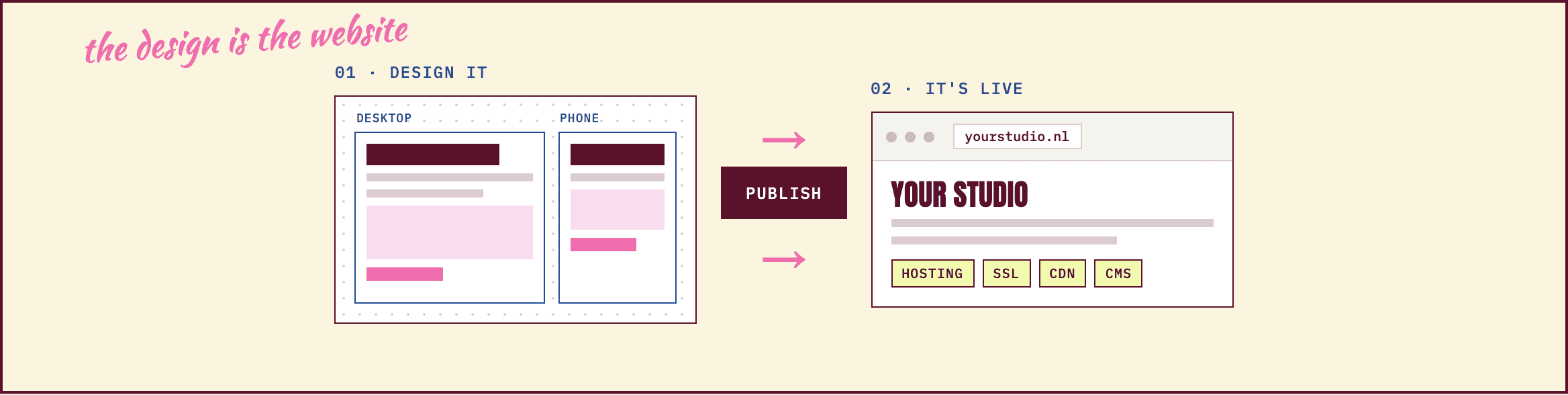
Framer is a website builder that started as a design tool: you design your pages on a canvas, press Publish, and they go live as a real website. Hosting and SSL are included, and a site with your own domain starts at $10 a month, billed yearly. It's a strong choice for studios, coaches, service businesses and portfolios. It isn't a webshop: Framer has no cart or checkout of its own.
In short
Framer is a design tool that publishes the website for you. There's no hosting, server or update to arrange.
The paid site plans are Basic ($10 a month) and Pro ($30 a month), billed yearly. Redirects and a staging site come with Pro.
For a product store with a checkout, Shopify is the better place. You can link a Framer site to a Shopify store.
When people ask what our own website is built with, the answer is Framer. It's also one of the two platforms we design Brand Sites in, next to WordPress. So you know where we stand: we like it, and we use it.
That's exactly why I want to be clear about what it is and what it isn't. Framer is very good at turning a design into a fast website that you can keep updating yourself. It's less good at things it was never built for, like running a store. If you know that before you start, you choose it for the right reasons, and you don't end up rebuilding a year later.
What is Framer?
Framer is a platform for designing and publishing websites. You work on a visual canvas, and what you see there is what visitors see in their browser. You design the desktop and phone versions side by side, add text, images, animations and forms, and press Publish. A few seconds later, the site is live.
Framer launched in 2014, started by two founders who had been building software together in Amsterdam, as a tool for designers. It grew into a full website platform, with hosting, a CMS, SEO settings, analytics and languages built in. That history shows: you're designing a page, not filling in a template.
The technical part is taken care of. Framer hosts your site on Amazon Web Services, delivers it through a worldwide network so it loads fast everywhere, and renews the SSL certificate (the padlock in the browser) for you. There are no plugins to update and no server to secure, because you don't have one.
What is a Framer website good for, and when isn't it?
A Framer website works best when its job is to show who you are, explain what you do and help the right people take the next step. That's often:
Creative studios and agencies, who want their site to feel as considered as their work.
Coaches, therapists and consultants, whose site has to build trust before the first call.
Service businesses, like architects or salons, with a few clear service pages and a contact form.
Portfolios and launch pages, where the images do the talking and the page has to go live quickly.
It's not the right fit when the business depends on something Framer wasn't made for: a product store with a cart and checkout (more on that below, and in What is Shopify and how does it work?), a content site with thousands of articles, or a site that leans on many plugins, like a members area or an online course.
How much does Framer cost?
Framer has a free plan to try it, and two paid site plans for a real website with your own domain. You pay per site, in US dollars, and Framer adds any tax for your country at checkout. These are the prices with yearly billing, as Framer shows them:
Free | Basic | Pro | |
|---|---|---|---|
Price | $0 | $10 / month | $30 / month |
Your own domain | No, a Framer address | Yes | Yes |
Pages | To try Framer | 30 | 150, more for $20 per 100 |
CMS | To try Framer | 2 collections, 1,000 items | 10 collections, 2,500 items |
Bandwidth | 1 GB | 50 GB a month | 100 GB a month |
Redirects | No | No | Yes |
Staging site | No | No | Yes |
Extra languages | One, to try | $20 a month each | $20 a month each |
Source: framer.com/pricing, checked October 2026. Prices per site, with yearly billing; paying month to month costs more. Extra editors are $20 a month, content editors $10. Framer's own WordPress migration guide confirms that Basic doesn't include redirects.
Basic or Pro comes down to three questions. Are you moving from an old site and need redirects to keep its Google traffic? Do you want a staging version to check changes first? Will your content grow past 1,000 items? If all three are no, Basic is usually enough, and you can upgrade later.
For all the running costs, domain and cookie tool included, see How much does a website cost in 2026?
The Framer CMS: blogs and case studies
The CMS is where you keep content that repeats: articles, case studies, services or events. You design one layout, for example "case study", and every item you add gets its own page in that layout, with its own address that Google can find. Each item can have its own title and description for search.
Basic includes two collections (say, Articles and Projects) and 1,000 items, which covers what most Brand Sites need. Pro has ten collections and 2,500 items. If you plan a big content site from day one, compare those limits with your plans before you choose a platform, not after.
Is Framer good for SEO?
Yes, for the things that matter most. Google doesn't prefer one platform. It prefers pages that load fast and say clearly what they're about. Framer handles the technical basics, and leaves the content to you:
Done for you: sitemap.xml and robots.txt are generated automatically, images are optimized and SSL is always on.
Yours to set: a title and description for every page and CMS item, one clear H1 per page, and alt text for your images.
Languages: with a second language, Framer sets the language tags (hreflang), so Google shows the Dutch page to Dutch searchers.
Redirects need Pro. Moving from an old website? Every old address should send people and Google to its new page, which keeps the rankings you've built. On Framer, that needs the Pro plan.
What Framer can't do is write the page. A fast site that doesn't say what you do, for whom and where, still won't be found for it.
Framer templates: a good start, not the whole job
Framer's marketplace has free and paid templates for portfolios, studios and coaches, and you can change every part of them. That's a good, quick start. Just remember a template was designed for someone else's story. It decides what comes first and where the button sits, so if your business doesn't follow that order, you end up shaping your story to fit the template, instead of the other way around.
Can you sell products with Framer?
Not on its own. Framer has no cart, checkout or stock management built in. Marketplace plugins can add payments or connect a Shopify store, but the store always runs somewhere else. Here's how we look at it:
You sell a few things next to your services, like a workbook or a gift card. A payment link or buy button on your Framer site is often enough.
You want a Framer site and a store. Keep the brand site in Framer and link to your Shopify store for the shopping. Shopify's Buy Button, included in every Shopify plan, can also place products on a page outside Shopify.
Products are the heart of the business. Then the whole site belongs on Shopify, with the checkout, iDEAL, stock and shipping in one place. A Shopify store can tell your brand story just as well.
Not sure which side you're on?
Ask where your revenue will come from in a year. If most of it is products in a cart, start with Shopify. If most of it is clients who contact you first, start with Framer, and add a store when the products are ready.
Framer vs WordPress, Webflow, Wix and Squarespace
Here is how Framer compares with four platforms you will likely come across. They can all make a good website. The real difference is who looks after it, how much freedom the design has and what happens when you want to sell.
Framer | WordPress | Wix or Squarespace | Webflow | |
|---|---|---|---|---|
What it is | A design tool that publishes the site | Free software you install | Website builders with templates | A visual builder close to how developers work |
Hosting | Included | You choose and pay a host | Included | Included |
Updates and security | Done by Framer | You or your developer | Done by the platform | Done by Webflow |
Design freedom | Very high, on a free canvas | High, through themes and code | Within the template's structure | Very high, with more to learn |
CMS | Built in, 1,000 to 2,500 items | The strongest for lots of content | Blog and collections built in | Built in, on the CMS plan |
Selling products | No checkout, link to Shopify | With the WooCommerce plugin | Store features on paid plans | Own checkout, on ecommerce plans |
From, own domain | $10 / month | Hosting from €9.99 / month | Squarespace from €12 / month | $15 / month |
Yearly billing, checked October 2026: framer.com/pricing; TransIP WordPress hosting Core, regular price excluding BTW; squarespace.com/pricing (Basic €12, or €17 billed monthly, 2% fee on store sales); webflow.com/pricing (Basic $15 without CMS, the CMS plan $25, ecommerce from $29 with a 2% transaction fee). Wix sets prices per country, see wix.com/plans.
Framer when design and a looked-after site matter most, WordPress for lots of content with someone to maintain it, a builder to make it yourself, Webflow for more technical control. We compare each pair in WordPress, Framer, Webflow or Wix?
TOOL: PLATFORM FINDER
Can you edit a Framer website yourself?
Yes, and for many founders that's the main reason to choose it. You change texts and images right on the page, add an article or project in the CMS, and publish when you're ready, without any code. Every publish is saved, so you can go back to an earlier version. Extra people cost a seat: content editors who update texts and the CMS are $10 a month, editors who can also design $20.
Design changes take more care, because that's where a designed site slowly starts to look less designed. A good handover shows you what's safe to change.
Our own website is built in Framer
We built designbykarina.com in Framer, so you can see what it does in practice. The huge headline, the colors and the spacing were designed on the canvas, and the phone version sits in the same file as the desktop one.

designbykarina.com, our own site, built in Framer. The layout was designed on the canvas and published as it is.

The phone version, designed in the same file.
It also showed us the limits first-hand: our redirects need the Pro plan, and a Dutch version needs the languages add-on. Those are the running costs worth knowing before you choose a plan.
Good to know in the Netherlands
Good to know in the Netherlands
Framer gives you the website. A few Dutch rules are still yours to cover:
Cookies and the AVG. Framer's own analytics doesn't use cookies, so it needs no banner. Add Google Analytics, a Meta pixel or YouTube videos, and you need a banner that asks for consent first. Framer has a cookie banner component that works with Google's Consent Mode.
Who's behind the site. Show your business name, address, email address and KVK number, and your BTW number if you charge BTW.
A privacy statement that says what you do with what people send through your contact form.
Dutch and English. With the languages add-on, each extra language is $20 a month, and the language tags for Google are set for you.
Your business is in Belgium?
You show your ondernemingsnummer from the KBO instead of a KVK number. Clients in Brussels or Wallonia? A French version is often worth it, one more language add-on.
Website laten maken in Framer: yourself or with a designer?
Framer is easy to start with, and plenty of people build a good first site on it themselves. Whether you should depends less on the tool and more on what the site has to do. Build it yourself when you're testing a new offer and the main thing is to be online. Use a template with some help when you know exactly what to say. Work with a designer when the site has to bring in clients and you're not sure yet what it should say first, or to whom.
I've seen €15K websites that don't convert, and simple ones that work because they clearly say who they help. So when you look for a Framer designer in the Netherlands, ask to see live Framer sites they've built, who writes the structure and the words, and what you'll be able to change yourself afterwards.
NOT A TOOL
The tool makes building easy. Saying it clearly is the work.
From coaches and creative studios to growing service businesses, we design thoughtful websites that communicate what you do, build trust and help the right people take the next step.
Who we are, and what we do
We're Design by Karina, a boutique Shopify agency in Rotterdam. We design and build strategy-led Shopify stores for ambitious fashion, beauty and lifestyle brands. Combining brand strategy, UX and thoughtful design, we create shopping experiences that turn what makes you different into a reason to choose you. And not every business needs a store: for coaches, studios and service businesses, we design Brand Sites in Framer or WordPress.
Ecommerce strategy
Who is buying, what do they need to know, and what helps them choose your brand? We define the positioning, customer journey and store structure before design begins.
Shopify design
A store should feel unmistakably yours and make shopping intuitive. We design brand-led Shopify experiences, from the homepage to product pages, with mobile users in mind.
Shopify development & migration
From custom Shopify theme development to platform migrations. Moving from WooCommerce or another platform? We help you make the transition with a clear plan for your store, content and customer experience.
Conversion & retention
What customers need to see, understand and feel before they choose, from product pages to the emails after the sale.
Growth after launch
We look at how real visitors use your store and make prioritized improvements over time.
Brand Sites
For coaches, creative studios and service businesses with something to say, designed in Framer or WordPress.
Why founders choose us
Strategy before pixels. Before opening a design file, we want to understand who buys from you and what they need to see first.
A background in product design. Before starting Design by Karina, I worked in product design at Uber, helping shape payment experiences for drivers.
Fewer projects, more care. We limit the number of projects we take on at a time, so I'm closely involved in every one.
We say it straight. If a builder you run yourself is enough for now, or your site should really be a Shopify store, we'll tell you.
Launch is the starting line. After launch, we keep improving the site with what real visitors do.
What does a Framer website cost with us?
How we work | From | Best for |
|---|---|---|
Brand Site | €2,900 | Coaches, studios and service businesses: a website in Framer or WordPress that says what you do and brings in inquiries |
The Launch | €4,500 | When you sell products: your first proper Shopify store, with your brand applied to a proven theme |
The Atelier | €6,900 | An established brand that wants a Shopify store designed for it, not a template with a logo on it |
A Brand Site starts with a 90-minute strategy session and a written brief, and a sitemap you approve before any design. Then five to six pages in Framer or WordPress, a contact or booking form, mobile checked screen by screen, a polish of your existing copy in one language, the SEO basics plus analytics, and a guided launch with a training video and 30 days of support. You'll see every item and the exact price in your proposal before we start.
The short version
Framer is a design tool that publishes real websites, with hosting, SSL and a fast network included. Basic is $10 a month and Pro $30, billed yearly, and Pro adds redirects and a staging site. It fits studios, coaches, service businesses and portfolios, and you can update it yourself. It has no checkout, so when products are the business, choose Shopify. In the Netherlands, add your KVK details, a privacy statement and a cookie banner once you use tracking.
From the studio
What we see with clients
When founders ask us about Framer, the platform question is often the easy part. The harder one comes right after: what should the site say first? We usually start there, because once the homepage knows its job, choosing between Framer, WordPress or a Shopify store tends to answer itself.
Questions
What is Framer used for?
Designing and publishing websites: studio and agency sites, websites for coaches and service businesses, portfolios and launch pages. You design on a canvas, and Framer hosts the site.
Is Framer free?
You can publish on a Framer address for free. For your own domain you need Basic, $10 a month, or Pro, $30 a month, billed yearly.
How much does Framer cost per month?
Basic is $10 and Pro $30 a month per site with yearly billing, plus any tax for your country. Month to month costs more. Extra languages are $20 a month each.
Is Framer good for SEO?
Yes. It generates your sitemap, serves the site fast and lets you set a title and description per page and CMS item. Redirects, needed when you move from an old site, come with Pro.
Can I build a webshop with Framer?
Not with Framer alone, because it has no cart or checkout. A payment link works for a few items. For a real product store, use Shopify, for the whole site or linked from your Framer site.
Framer or WordPress: which is better?
Framer when design matters and you want a site that's looked after for you. WordPress for very large content sites or specific plugins, with someone to keep it updated. Both can rank well.
Framer or Webflow?
Both give a lot of design freedom and include hosting. Webflow works closer to how developers build and has its own store plans. Framer is quicker to learn and simpler to edit afterwards.
Framer or Wix and Squarespace?
Wix and Squarespace are made for building it yourself from a template, with store features on paid plans. Framer gives more design freedom, which shows most when a designer builds the site.
Can I edit my Framer website myself?
Yes. You change texts and images on the page, add articles or projects in the CMS and publish when you're ready. Every publish is saved, so you can go back.
Can a Framer site have Dutch and English?
Yes, with the languages add-on, $20 a month per extra language. Framer sets the language tags for Google, so each version reaches the right searchers.
What does it cost to have a Framer website made?
It depends on the pages, the languages and who writes the words. Doing it yourself costs your time and a plan from $10 a month. With us, a Brand Site in Framer starts at €2,900.
Who designs Framer websites in Rotterdam?
Rotterdam has many good designers and studios working in Framer, and the right one depends on whether you need mostly design, mostly words, or both. We're one of them: Design by Karina is a boutique Shopify agency in Rotterdam that also designs Brand Sites in Framer, starting with the strategy.
Your store, your numbers
Want a straight answer for your own store? Book a free call and we’ll walk through it together.
Sources
Framer pricing, framer.com/pricing: plans, limits, languages and editor prices (checked October 2026)
Framer Help Center: hosting, SEO features, localization and hreflang, GDPR and cookies (checked October 2026)
Framer guide "How to migrate from WordPress to Framer": redirects not included on Basic (checked October 2026)
Framer, About page: founded in 2014 (checked October 2026)
Framer Marketplace, ecommerce plugins (checked October 2026)
Shopify Help Center, Buy Button sales channel, included in all plans (checked October 2026)
Webflow pricing, webflow.com/pricing (checked October 2026)
Squarespace pricing, squarespace.com/pricing (checked October 2026)
TransIP, WordPress hosting Core, regular price excluding BTW (checked October 2026)
Wix plans, wix.com/plans: prices vary by country (to confirm for the Netherlands)
Karina Paviotti
Founder, Design by Karina
Karina Paviotti is the founder of Design by Karina, a boutique Shopify agency in Rotterdam. Before starting the studio, she worked in product design at Uber, shaping payment experiences for drivers. Today she leads every project, from strategy to launch, for founder-led fashion, beauty and lifestyle brands.


